
Desktop printing
Print map backups from desktop.
Use desktop printing when paper still matters: plan the area, choose scale and layout, include grid detail, and print around the route or area you need.
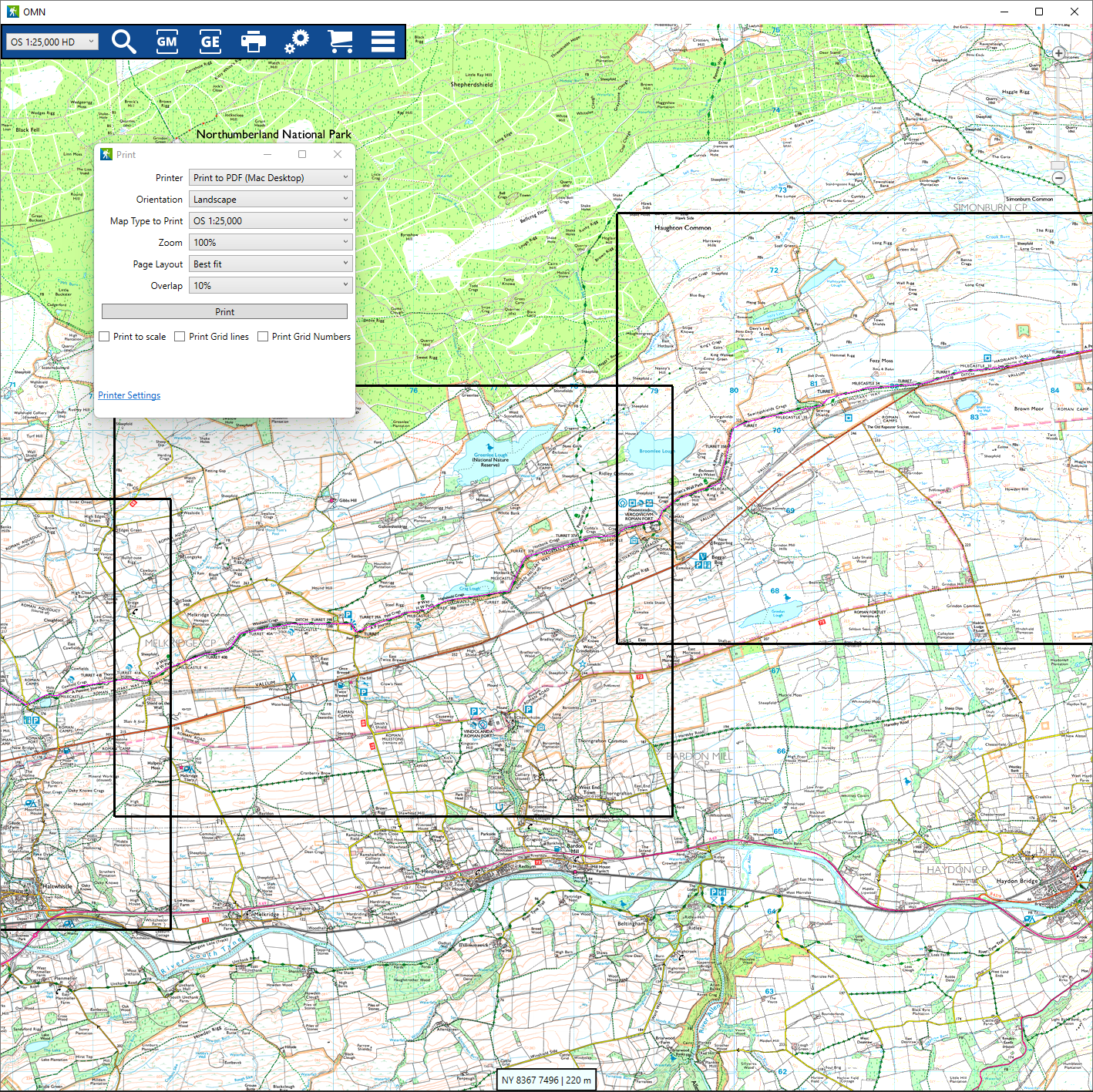
Choose scale and layout
Use desktop printing to choose the scale, paper orientation, and map area that fit the day you are planning.
- Choose a scale before printing.
- Use the layout that fits the route or area.
Use single-page or multi-page output
Print one page for a compact backup or spread a larger area across multiple pages when the route needs more room.
- Keep the map readable at the scale you choose.
- Use overlaps and page layout to cover a larger route area.
Include grid detail
Grid lines and grid numbers help a paper backup remain useful when you are away from the screen.
- Print with the grid context you need.
- Keep required map attribution with map output.
Use route-aware printing where proven
Print around the route or area you care about so the paper backup matches the plan.
- Use best-fit output when it helps the route fit the page.
- Prepare a paper fallback for places with weak signal or low battery.
Help and detail
Use the help centre when you want step-by-step setup, platform, or workflow instructions for this feature.
Ready to plan properly?
Start a 7 day trial, install OMN4 on the devices you use, and download the maps you need before your next route.